
Chromebooks don't belong in the bathroom. Hall passes should be paper.
So the student takes a paper pass and goes. Your one step, a quick photo of the pass, takes no longer than approving a request in the old app.
Hallpass keeps the paper pass your school already uses and does the recording for you — who's out, where they went, and who never came back.
Try it freeWhat Hallpass does
Students get a paper pass. Adults use the app.
So staff can check any pass on a phone, and every trip out of class is documented.
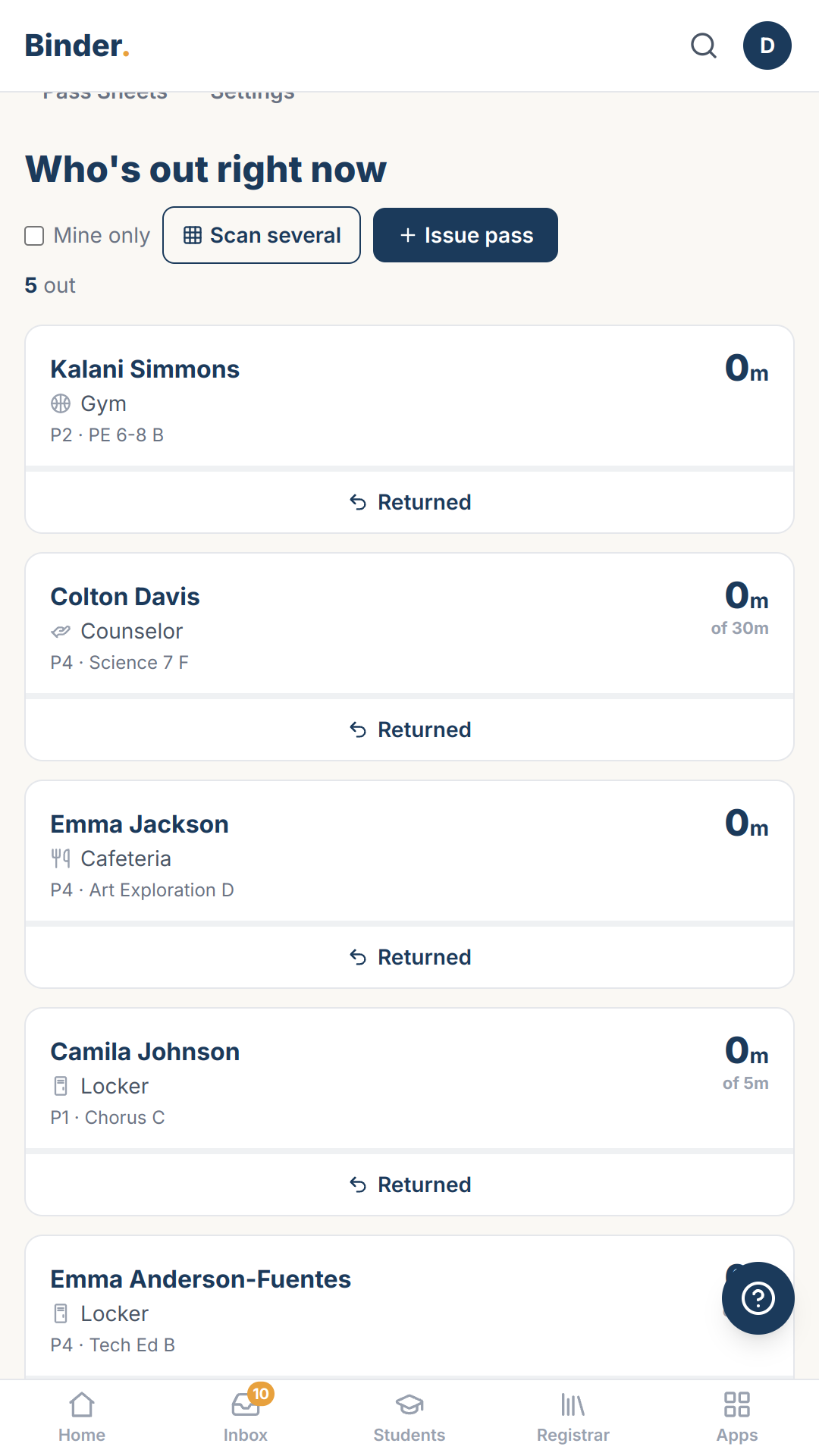
See every student out on a hall pass, on one screen, in real time.
So administrators check the list instead of tracking down and questioning every student in the hall.
Binder alerts you to potential problems before you send a student out—when too many students are already out, or when two students who need to be kept apart would both be in the hall.
So you catch a crowded bathroom or a risky pairing before the student leaves the room.
Know why every student you pass in the hallway is out of class—without having to confront them.
So you can greet a student by name, check your phone, and see they're headed to the nurse. If there's no pass, you'll see that too.
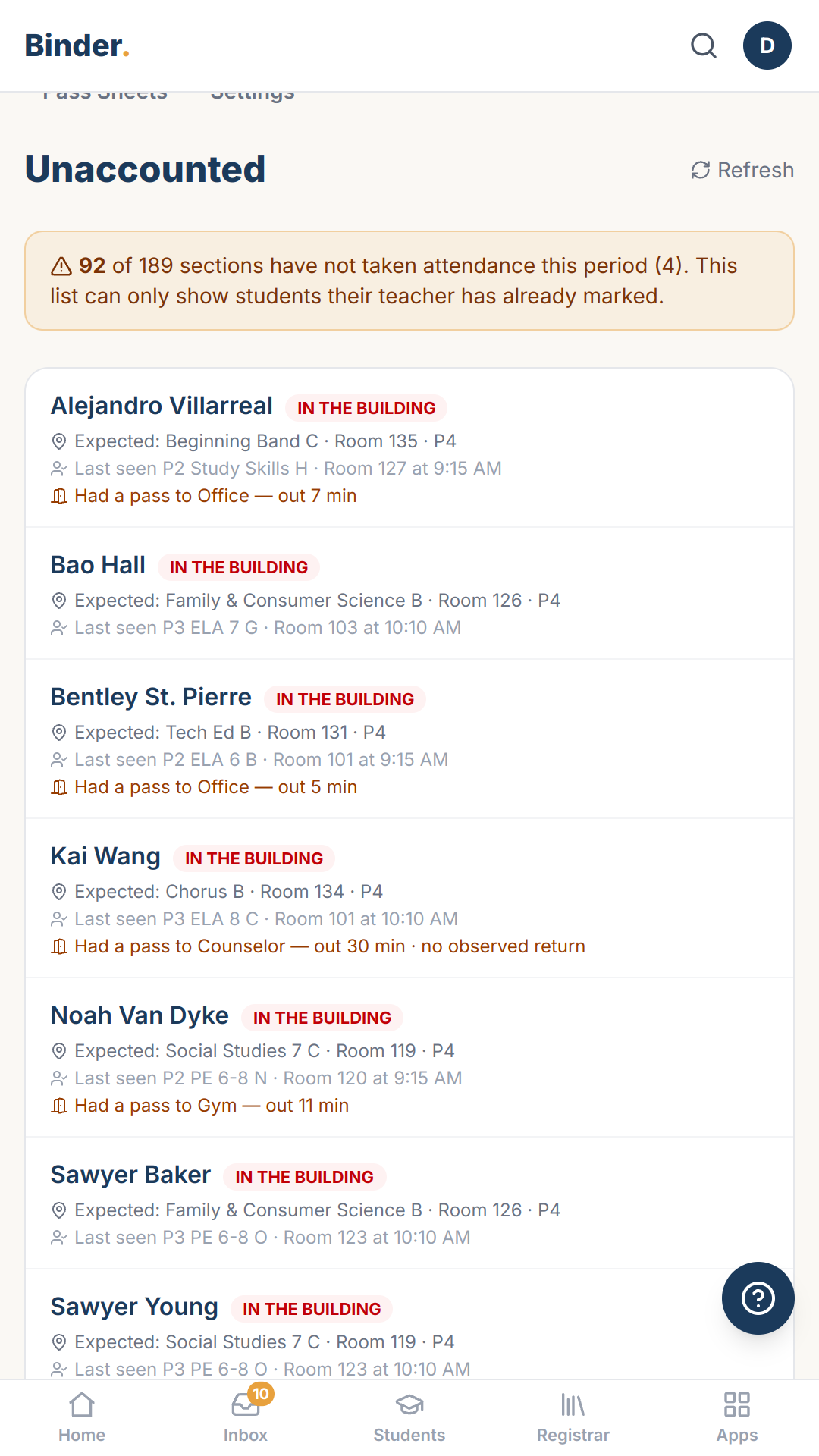
See which students were in class earlier today but aren't in class now.
So you can find students who are skipping the moment teachers take attendance and get everyone to class.
Hall passes still work on sub days. The sub gets a link, not a login.
So the office sees every pass a sub issues, the same day.
See which students leave class most often, and for how long.
So a conversation with a student or family starts with the actual record.
When a drill starts, Binder shows which students were out on a pass and where they went.
So teachers know who to look for, and where to start.
Sound familiar?
- “With our old app, students had to log in, fill out a hall pass, and interrupt my teaching so I could approve it. Then they took a device to the bathroom.”
- “In the hallway I can't tell whether a paper pass is real, and at the end of the day there's no record of who went where.”
- “When a hall pass is a doorstop with the room number written on it, I have to stop every student and ask why they're out of class.”
- “With our sign-out clipboard, I had no way to know the bathroom already had four kids in it, or that the two boys who fought last week were both out.”
- “Every kid I pass in the hall, I have to stop and ask where they're supposed to be. It starts the conversation as an accusation, and I still don't know if the answer is true.”
- “To catch a kid cutting third period, someone has to check every class's attendance against the day's absence list.”
- “On sub days, our hall pass walks out the door with any kid who asks.”
- “I know a few kids spend half of fifth period in the bathroom, but I can't show anyone the numbers.”
- “During a lockdown drill, we had no idea which kids were in the bathroom.”
Hallpass was built for schools that tried digital passes and went back to paper.
Hall passes show up here too
When a student is marked absent but a pass says they were at the nurse, you see it on their row—and can excuse it with the pass as the reason. Works with Attendance.
Before Binder sends an absence letter, it checks the hall passes. If she was at the nurse that day, it stops and shows you. Works with Attendance.
The pass shows up in the gradebook
If a student was out on a pass when work was due, the gradebook shows it next to the missing grade. One tap excuses it, with the pass as the reason. Works with Gradebook.
What the sub enters, the office sees
When a sub takes attendance from their phone, the office sees it right away, marked unverified until someone approves it. Works with Sub Packet, Attendance.
What you're using now
Most schools run passes on a wooden block, a sign-out clipboard by the door, and a teacher's memory. It works, and it tells you nothing afterwards: nobody can say who is out of class right now, and the clipboard can't notice a student who never came back. The digital alternatives ask every child to carry a device and log in, which is why so many schools tried one and went back to paper. Hallpass keeps the paper and does the noticing.
Every Binder app works like this
Built for your phone first
Every screen works in a hallway, not just at a desk.
Paper is a first-class input
Point your camera at a roster, a sign-out sheet, a stack of work — Binder drafts, you approve.
Your district's words
Labels and letters render in your district's own terminology.
AI drafts, people decide
Nothing becomes a record until a person says so.
More on how Binder works: the platform · security & privacy
Every Feature You'd Expect. Every Feature You'll Need.
The basics, so you can check them off.
- Destinations you define, with icons and ordering
- Printable pass sheets
- A hall-duty corridor view with timers
- Per-student restrictions and keep-apart pairs
- Access grants for subs and volunteers, no account needed
- Review and approval of unverified passes
14 days, no credit card, nothing to install. Explore with sample data, or bring your own roster.