8:05 attendance, done by 8:06.
No sticky notes, no re-typing, no call log. Attendance that finishes itself.
Binder takes attendance the way your building actually does it — teachers tap the exceptions, paper rosters count as a photo, and the office sees the whole school without leaving the desk.
Try it freeTeachers mark it in seconds — first thing, from the room, while the class settles.
Families get the notice automatically and can text back an excuse in any language. No phone tag, no translation scramble.
The office approves it with one tap. The excuse, the note, and the record all live in one place — because it's all one system.
What Attendance does
Take attendance in seconds. Start with the absences the office already knows about, mark any others, and you're done.
So you can start teaching when the bell rings.
When a student marked absent was out on a hall pass, you see the pass right next to the absence.
So you can correct the absence in one click, with the pass as the reason.
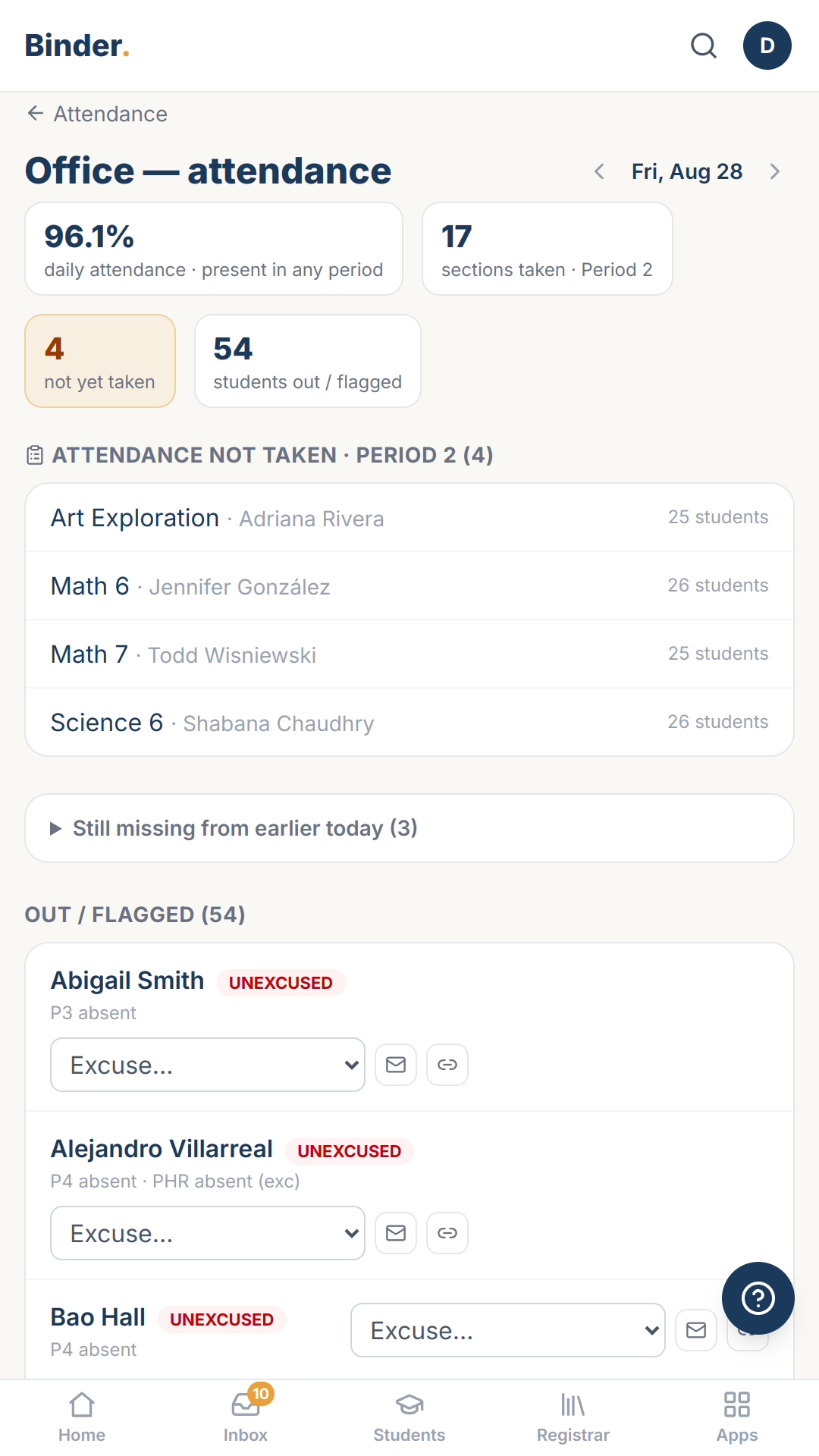
Binder automatically flags absences that are explained by hall passes.
So parents are never wrongly notified that a student is absent.
Binder flags attendance that doesn't add up before it reaches your ADA numbers.
So the attendance you report for funding matches who was actually in school.
Take attendance on a paper roster while you greet students at the door, then snap a photo. Binder fills in the marks for you to check.
So you stay focused on your students and start class on time.
Subs take attendance from a link on their phone, or on a printed roster they send to the office.
So the office gets attendance from subs on time.
See which teachers haven't taken attendance before you trust today's absence list.
So you know which teachers to remind before the absence numbers go out.
When a parent calls in sick, every teacher's attendance already shows the student as absent.
So your attendance matches what the office already knows.
Sign out a whole team at once. Every teacher sees “Signed out for baseball game, 1:40pm,” and no player gets an unexcused absence.
So students at school activities keep a clean attendance record, and the office doesn't have to correct it afterward.
Every name on the attendance list has the student's photo next to it.
So a sub, or a teacher in the first week, marks the right student.
Sound familiar?
- “In our SIS, taking attendance means clicking through every name on the list while the class waits.”
- “When a teacher marks a kid absent who was actually with the counselor, I have to track down where they were before I can fix the record.”
- “A parent called the office upset because we'd reported their son absent from third period. He'd been at the nurse.”
- “Our ADA errors turn up in the audit, like a kid marked present in four classes on a day their parent called them in sick.”
- “To take attendance in our SIS, I have to sit down at my computer right when class should be starting.”
- “Our subs can't log in to the SIS, so their attendance shows up on a sticky note at the end of the day, if it shows up at all.”
- “Our SIS showed no absences all morning. It turned out four teachers hadn't taken attendance.”
- “A kid is home sick, and three of their six teachers mark them present anyway.”
- “When the baseball team leaves early, the coach emails a list, and the office spends the next morning clearing unexcused absences.”
- “On day one, a sub has 30 names and no idea which kid is which.”
Binder was built to retire every one of these.
What the sub enters, the office sees
When a sub takes attendance from their phone, the office sees it right away, marked unverified until someone approves it. Works with Sub Packet, Binder Hallpass.
The drill roll comes from the day’s records
Start a drill and the roll is already made — everyone expected on campus, sorted by where they were last seen. Works with Binder Hallpass, Emergency Drills.
What you're using now
Most schools run attendance on a shadow system: sticky notes on the doorframe, a paper roster walked to the office, a secretary re-keying it into the SIS while the phone rings. The SIS screen was built for the district report, not for 8:05. Binder starts from the way your building actually takes roll — paper included — and does the re-keying, the cross-checking and the letters itself.
Every Binder app works like this
Built for your phone first
Every screen works in a hallway, not just at a desk.
Paper is a first-class input
Point your camera at a roster, a sign-out sheet, a stack of work — Binder drafts, you approve.
Your district's words
Labels and letters render in your district's own terminology.
AI drafts, people decide
Nothing becomes a record until a person says so.
More on how Binder works: the platform · security & privacy
Every Feature You'd Expect. Every Feature You'll Need.
The basics, so you can check them off.
- Excused and unexcused reasons you define
- A "left class" mark for mid-period departures
- Each student's attendance history
- The office's daily dashboard
- Parents explaining an absence online
- Your school's own daily-attendance rule
- Backdating to a different day
Try Attendance with a sample school
Try it free14 days, no credit card, nothing to install. Explore with sample data, or bring your own roster.